


|
|
KiTTY : Send to trayLast modification : 2015/03/06 09:58 |

|
|
|---|---|---|
| Welcome / Recent changes / News / Forum / Download / Contacts | Edit | |
|
When you use KiTTY to run long background batches, or when KiTTY is just used to open SSH tunnels (with or without remote shell), you can move the window to the Windows system tray (the zone in the bottom-right corner of the screen). There are several ways to do this.
To create a session that runs directly in the system tray on startupTo create a session that starts directly in the system tray select the "Send to tray on startup" option in the Window/Behaviour panel of the configuration box. 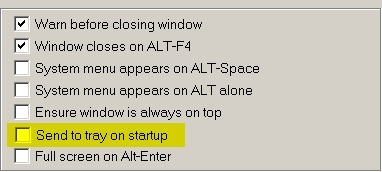
To move an open session into the system trayTo move a session that is already open into the system tray:
To run from the command-lineWhen running from the command-line, you can start a session directly in the system tray. Just use the option -send-to-tray. Back to home |
||
 L'adresse initiale de cette page est http://kitty.9bis.com/ L'adresse initiale de cette page est http://kitty.9bis.com/
Wiki utilisant PumaWiki 1.0, merci aux membres de la PuTTY Team 2026/06/10 00:57 -- en -- 216.73.216.230 -- |
||