


|
|
KiTTY : Shortcuts for pre-defined commandLast modification : 2015/03/06 09:58 |

|
|
|---|---|---|
| Welcome / Recent changes / News / Forum / Download / Contacts | Edit | |
|
A new registry key [HKEY_CURRENT_USER\Software\9bis.com\KiTTY\Commands] was created in the KiTTY binary tree of the Windows registry.
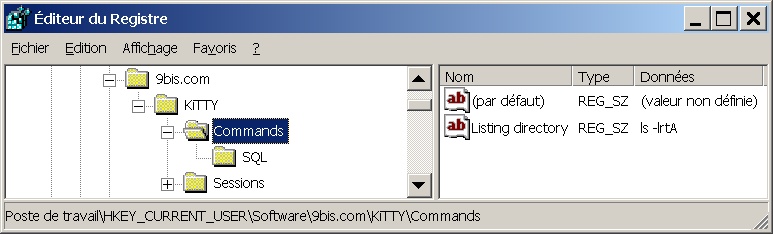
It is designed to define a new menu: "User command". 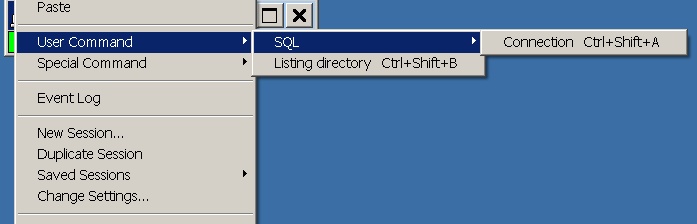
To create this new menu, download and run this example file. To reach this new menu press on CTRL and click on the right mouse button from any place within a KiTTY window. Then select menu "User Command". In the menu you can add as many commands as you want. Shortcuts (Ctrl+Shift+A ...), only available in regitry mode, are set up in the order of creation. You can disable the shortcuts option, if it interferes with other software (for example if you run Midnight Commander in a KiTTY window). You just have to add these two lines in the kitty.ini file: From KiTTY 0.60.56 two new shortcuts levels were added to the global level described above. It is possible to create
Back to home |
||
 L'adresse initiale de cette page est http://kitty.9bis.com/ L'adresse initiale de cette page est http://kitty.9bis.com/
Wiki utilisant PumaWiki 1.0, merci aux membres de la PuTTY Team 2026/06/10 00:49 -- en -- 216.73.216.72 -- |
||